What is a facebook fan page?
Facebook fan pages are just like facebook profiles which let your fans and customers connect to you and get notified about your latest activities. Fan pages attract more users than facebook groups due to the multiple embedding options and ability to publish posts in the news feeds which appear on the main page of your account. You can embed widgets on your website to let your fans and customers access to your live streaming activities. A very useful “Become a Fan” button can also be added to get your fans growing.
How to create a fan page?
Recently I have received a few messages about the creation of facebook fan page. Note that I am not talking about a group which is different from a fan page. I will add another article soon about the differences between facebook groups and fanpages. A lot of people get confused about how to start creating a fan page. This is because you won’t see any option or link to create a fan page. I am adding some useful pictorial steps for the creation of a facebook fan page.
Step 1:
Login in to your facebook account and go to this URL ( http://www.facebook.com/pages/). You will now see a page as shown in the below picture.
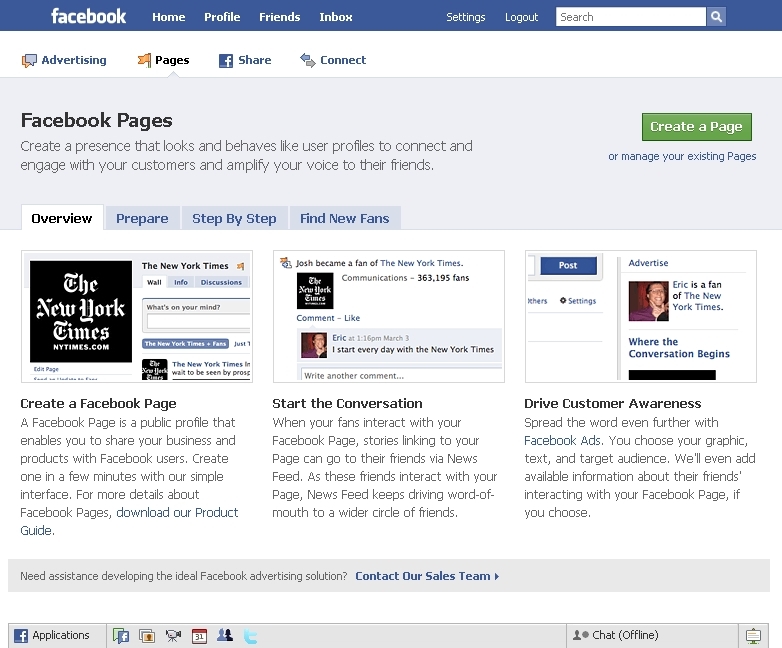
Step 2:
Now click the “Create a page” green button on the top-right of the page. Once you have done that, you will see another page same as shown in the below picture.

Step 3:
Now select a suitable category for you page, choose a name for it, enter your full name in the Electronic Signature Box and Click “Create Page”. you are done! You will soon see your empty fan page. You can make it more interactive and attractive by adding display picture and more tabs.

Like this tutorial? Join me to get more updates about Facebook Pages & Groups
Extra Tip:
Got to this link to see all the pages you have linked
Go to this link to see all the pages that you manage


 Imran Ahmed Hunzai
Leave a comment